A lithium battery that refuses to charge can seem completely dead, especially when its indicator stays dark. However, the problem may involve a depleted cell, damaged wiring, a faulty charger, or a protection circuit. Understanding the cause matters more than forcing a quick recovery.
This guide explains How to revive a lithium battery that won't take a charge using cautious, evidence-based checks. You will learn how to inspect the charger, clean accessible contacts, confirm voltage requirements, and allow a deeply discharged pack to rest before testing again. A compatible charger and a stable, supervised surface are essential. Never puncture, crush, open, short-circuit, or bypass a battery’s protection system. That shortcut can create intense heat, smoke, or fire.
Watch for swelling, unusual odor, hissing, leaking, or rapid heating. Stop immediately if any warning appears. Move away from combustible materials only when it is safe, and contact a qualified battery service provider. Do not place a damaged battery in household waste. Experience shows that patience often prevents further damage, although some packs cannot be safely recovered. I have seen batteries appear lifeless because of a poor connector, but I have also seen failed cells remain dangerous after charging. The condition is not always obvious. These methods therefore begin with low-risk inspection and end with professional evaluation, not forced revival. Reliable results require the correct battery chemistry, voltage, charger, and equipment. When those details are uncertain, replacement may be the wiser choice.
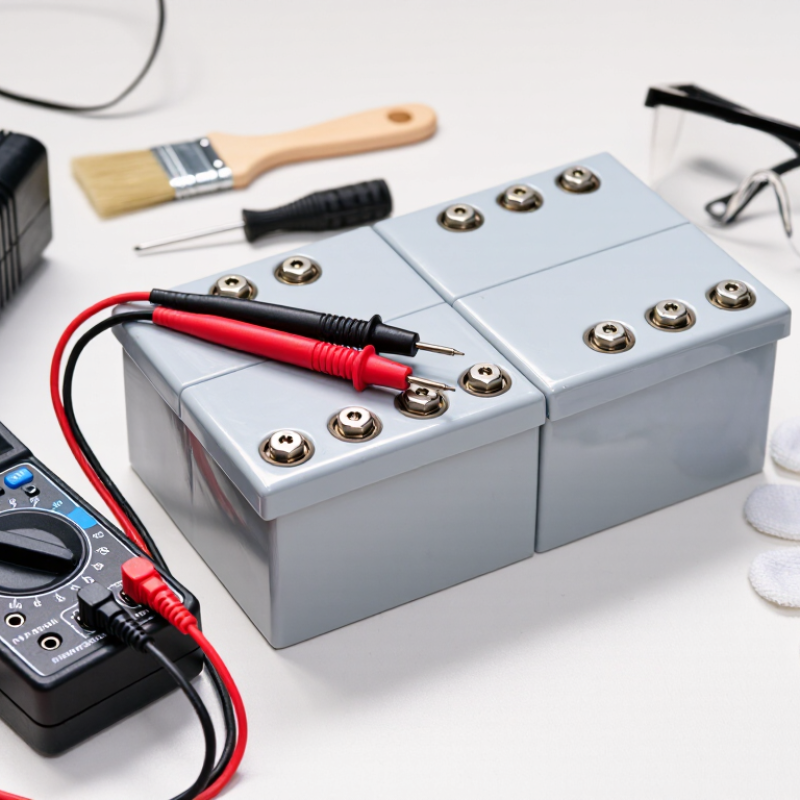
When a lithium battery will not charge, safety assessment comes before recovery. I inspect the case under bright light. Look for swelling, cracks, punctures, leaking fluid, discoloration, or a sharp chemical smell. Hissing, unusual heat, or smoke means immediate danger. Do not press the pack flat or reconnect it. A charger light can look reassuring, but it proves very little.
The U.S. Consumer Product Safety Commission reported 208 fire or overheating incidents involving micromobility products from 2017 through November 2022. These incidents included 19 deaths and 104 injuries. The report shows why a failed charge should not be treated as a simple technical fault. If the battery is hot, damaged, or wet, disconnect it only when safe. Place it away from buildings and combustible materials, without handling it unnecessarily. Contact qualified battery-recycling or emergency professionals for guidance. Never puncture, freeze, open, or repeatedly “shock” the pack. I would not guess here.
Tips: Let a cool, intact battery rest before testing it with its approved charger. Stop immediately if it heats, smells strange, swells, or makes noise. Check the cable, connector, and charging port for dirt or bent contacts. If the battery remains unresponsive, professional testing is safer than another charging attempt. The International Energy Agency reported nearly 14 million electric cars were sold globally in 2023, increasing the need for careful battery screening.
Typical single-cell lithium-ion voltage references are shown for initial screening. A nominal cell is about 3.6–3.7 V, while 4.2 V is a common full-charge limit and approximately 3.0 V is a common low-voltage region. A reading below about 2.5 V may indicate over-discharge and potential cell damage; do not attempt recovery if the battery is swollen, leaking, cracked, unusually hot, or physically damaged.
A lithium battery that refuses to charge is not automatically “dead.” The charger, cable, terminals, temperature, and battery-management system may be responsible. Check the connector for dust, looseness, corrosion, or bent contacts. Test with a verified charger and cable, then observe the indicator light and charging current. A common mistake is blaming the battery too quickly.
Temperature matters. Many lithium batteries stop accepting charge when they are too cold or too hot. Let the pack return to room temperature before testing again. If it is swollen, cracked, unusually hot, leaking, or producing a chemical odor, stop immediately. Do not force a charge. The International Energy Agency reported that global electric-vehicle battery demand exceeded 750 GWh in 2023, growing about 40% in one year. More batteries also mean more aging and fault conditions to diagnose.
Deep discharge can trigger the protection circuit, making the battery appear unresponsive. A qualified technician can check pack voltage, cell balance, and the management system with proper equipment. Never bypass that protection. The U.S. Department of Energy’s Battery500 research identifies temperature, high voltage, and repeated cycling as major contributors to lithium-ion degradation. A quick reset may help occasionally, but it is not a diagnosis. I would not treat every failed charge as recoverable; sometimes replacing the pack is the safer decision.
A lithium battery that will not charge may only need a careful connection check. Unplug the charger and inspect the cable for cuts, bent pins, or loose ends. Check the battery contacts, too. Dust, moisture, or a small piece of debris can interrupt charging. Use a dry, lint-free cloth. Never scrape contacts with metal tools.
Try a safe reset by disconnecting the battery from the device. Remove the charger, then wait about ten minutes. Reconnect the battery firmly before attaching a charger with the correct voltage and connector. Watch the indicator light for changes. If the battery remains completely unresponsive, do not repeatedly force charging. A protection circuit may have entered sleep mode, or an internal cell may be damaged. Resetting cannot repair every fault. I have seen people blame the charger too quickly, while the real problem was a loose socket.
Tips: Keep the battery on a hard, nonflammable surface during testing. Stop immediately if it becomes hot, swollen, cracked, wet, or smells unusual. Do not open the casing, short the terminals, freeze the battery, or use an improvised charger. If a multimeter is available, trained users can check the charger’s output. Incorrect measurements can cause damage. When basic checks fail, seek a qualified battery technician instead of guessing.
Top Ways to Revive Lithium Batteries That Will Not Charge?
A dead lithium battery may only have triggered its protection circuit. Use a compatible charger, not a stronger one. Check the battery’s chemistry, voltage, connector, and required charging current first. The charger must match the battery pack’s specifications. A mismatch can create heat, unstable charging, or permanent damage.
Place the battery on a nonflammable surface and monitor it closely. If the charger refuses to start, allow a qualified technician to test the pack with professional equipment. Do not bypass the protection circuit or connect another battery to force charging. Stop immediately if the pack becomes swollen, hot, cracked, wet, or smells unusual. Lithium-ion battery demand is growing rapidly; the International Energy Agency reported nearly 14 million electric car sales in 2023, showing why safe battery handling matters.
Tips: Clean and inspect the terminals. Let a cold or hot battery return to room temperature. Try a short, supervised charging session only with the correct charger. Never leave a recovering battery unattended. This approach is cautious, but not perfect. A battery can look normal while containing internal damage. The U.S. Consumer Product Safety Commission continues to warn that damaged lithium-ion cells can cause fires, reinforcing the need for controlled charging and professional evaluation.
Top Ways to Revive Lithium Batteries That Will Not Charge?
A lithium battery that will not charge may have entered a protection lockout after deep discharge, overheating, or a short circuit. Remove it from the device and inspect the casing carefully. Swelling, cracks, leaking fluid, a sharp chemical smell, or unusual warmth means stop immediately. Do not press, puncture, open, or freeze the battery.
If the battery looks normal, use only the correct charger and connection. Check the cable, charging port, and power source for visible damage. Place the battery on a nonflammable surface and supervise a short charging attempt. Never leave it charging overnight. A compatible charger may restore a battery that is merely deeply discharged, but repeated resets can create risk. This is where many online repair tips become careless.
Know when to stop. If the battery remains cold and unresponsive, becomes hot, makes a hissing sound, or shows swelling, disconnect power without handling it unnecessarily. A qualified technician should assess uncertain cases. My practical rule is simple: a small battery is not worth a fire, injury, or damaged property. I have found that persistence can feel responsible, yet stopping early is often the safer decision. Place damaged batteries in a safe, isolated container temporarily, and contact an approved battery-recycling facility for handling instructions. Never place lithium batteries in household trash or regular recycling bins.
| Possible Cause | Low-Risk Action to Try | What to Check | Typical Result | When to Stop | Recommended Next Step |
|---|---|---|---|---|---|
| Incorrect or damaged charger | Inspect the cable, connector, adapter and charging port. Try only a compatible charger designed for the battery or device. | Look for bent pins, loose connections, broken insulation, dirt or moisture. Do not use visibly damaged equipment. | The charging indicator may return if the original problem was the power connection. | Stop if the charger, cable or port becomes hot, smells unusual, sparks or shows damage. | Replace the faulty charger or have the device inspected by a qualified technician. |
| Battery is too cold or too hot | Move the device to a dry indoor area and allow it to return naturally to room temperature before charging. | Check whether the battery was recently exposed to freezing conditions, direct sunlight or another heat source. | Charging may resume after the battery reaches a normal operating temperature. | Never heat, freeze, place in an oven, or cool the battery with water or ice. | If charging remains disabled at room temperature, arrange professional service or recycling. |
| Deep discharge or prolonged storage | Connect the battery to its correct charger and monitor it in a nonflammable location for a short period according to the device instructions. | Use the device’s normal charge indicator. Do not measure, bypass or apply external power unless you are trained and equipped to do so. | A healthy protected battery may slowly begin charging; a failed battery may show no response. | Stop immediately if there is heat, swelling, hissing, leakage, smoke, odor or visible damage. | Do not repeatedly attempt charging. Use an authorized repair service or battery-recycling facility. |
| Dirty or obstructed contacts | Disconnect power and gently remove loose surface dirt from accessible contacts with a clean, dry cloth. | Check for corrosion, liquid, debris or misalignment without inserting metal tools. | A clean, undamaged connection may restore normal charging. | Do not scrape contacts, use liquid cleaners, or continue if corrosion or liquid has entered the device. | Have the device professionally cleaned or replace and recycle the battery if necessary. |
| Charging software or protection lockout | Restart the device, install available system updates and follow the manufacturer’s documented reset procedure. | Confirm that the charging setting is enabled and that the device recognizes the correct battery. | Charging can return if the issue is caused by a temporary software fault. | Do not bypass protection circuits or alter battery-management electronics. | Seek qualified service if the lockout continues or the battery shows physical damage. |
| Battery has reached the end of its service life | Compare the current runtime, charging behavior and physical condition with the device’s normal performance. | Frequent charging, rapid discharge, repeated shutdowns and reduced capacity indicate aging. | An aged battery may charge slowly, hold little energy or fail to charge at all. | Do not open, puncture, crush, solder, rebuild or continue using a swollen or damaged battery. | Replace it with a compatible battery and recycle the old one through an approved collection channel. |
| Physical damage, swelling or leakage | Disconnect the charger if safe to do so, keep people and combustible materials away, and avoid handling the battery unnecessarily. | Check for bulging, dents, punctures, torn casing, leaking electrolyte, smoke, unusual odor or excessive heat. | A damaged battery must not be treated as a normal charging fault. | Stop all charging and use immediately when any warning sign appears. | Contact local emergency services for an actively smoking or burning battery; otherwise ask a qualified hazardous-waste or battery-recycling provider for handling instructions. |
The charger, cable, connector, temperature, or protection system may be responsible. The battery is not automatically dead.
Check for dust, moisture, corrosion, bent contacts, loose connections, or cable damage. A small debris fragment can stop charging.
Disconnect the charger and battery. Wait about ten minutes. Reconnect the battery firmly, then attach the correct charger.
Let it return to room temperature before testing. Avoid charging it near heaters, in direct sun, or in freezing conditions.
Stop immediately. Do not charge a battery that is swollen, cracked, leaking, unusually hot, wet, or producing a chemical odor.
Never bypass it. Deep discharge may activate protection, but only qualified technicians should test voltage, cell balance, and internal controls.
No. A reset may help occasionally, but it cannot repair damaged cells or every internal fault. I might blame the charger too quickly.
Use a verified charger with the correct voltage and connector. Test on a hard, nonflammable surface away from loose materials.
Do not open the casing, short the terminals, freeze the battery, or use an improvised charger. Seek a qualified technician when basic checks fail.
Reviving a lithium battery that will not charge should begin with safety, not experimentation. Inspect the battery for swelling, cracks, leaks, unusual heat, odor, corrosion, or other visible damage. If any of these signs appear, stop handling it, keep it away from flammable materials, and arrange responsible recycling. When no damage is visible, consider possible causes such as a deeply discharged cell, dirty or loose contacts, a faulty cable, an incompatible charger, or a device that is preventing charging because of temperature.
The safest approach to How to revive a lithium battery that won't take a charge is to clean and reconnect the terminals, restart the device, and use a compatible charger under normal conditions. Allow the battery to return to room temperature and monitor it while charging; never force current, bypass built-in protection, open the pack, or leave it unattended. If the battery remains unresponsive, becomes hot, or shows any unusual behavior, stop trying to revive it and take it to an approved battery recycling or collection service.

Hyper Charger